TL;DR
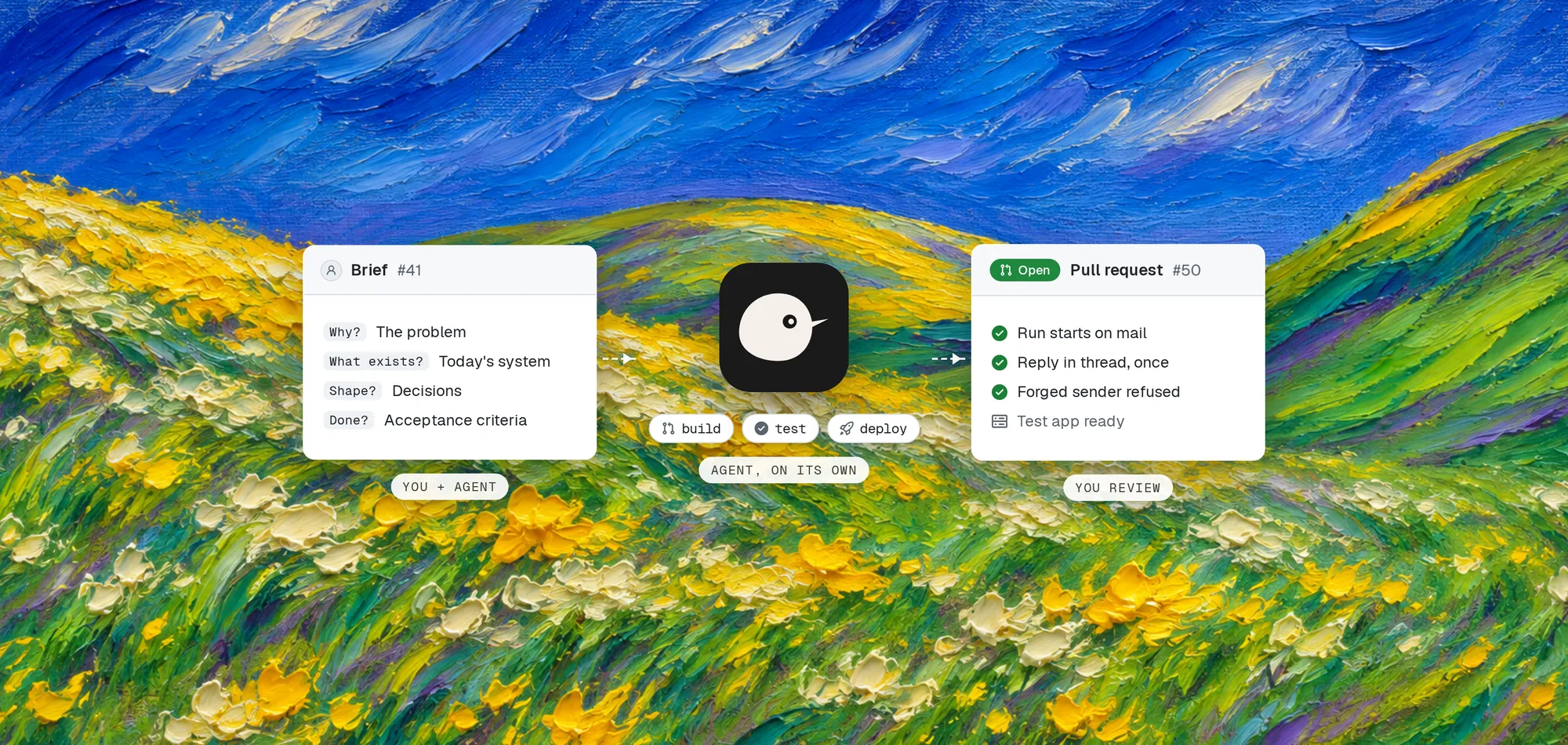
The slow part of working with coding agents is no longer the agent. It’s you, sitting next to it and approving every step (without fully understanding what’s going on, let’s be real). On zwrm we take the opposite approach. You and the agent agree on a short brief with clear acceptance criteria. Then the agent builds, tests and deploys in its own isolated environment and comes back with a pull request and a running app to review. You spend your time where it counts, at the start and the end, and stay out of the middle.
The babysitting problem
Picture a typical session with a coding agent today. You open a terminal and type a prompt. Then you watch. “Can I run npm install?” Yes. “Can I edit config.ts?” Yes. That’s necessary because if it screws up the machine, it’s your machine.
But that’s not delegation. It’s pair programming with a very fast junior developer who can’t be left alone. The agent can only go as fast as your attention allows, and running a second agent means a second terminal to keep an eye on.
This synchronous style has its place. When you’re exploring an idea or tweaking a UI with live reload, you want to be in the loop. For most of a real product backlog, though, the bottleneck isn’t how fast code gets typed. It’s how clear the task is: what should be built, why, and how you’ll know it’s done.
Our philosophy: brief first, then let go
Think about how you’d hand work to a senior colleague. You don’t sit behind them and approve every keystroke. You agree on what to build and why, you agree on what “done” means, and then you let them get on with it. You see them again at review.
zwrm is built for that model. Every agent gets its own environment and can do the whole job there: code, test, deploy. It gets its work from the tools your team already uses, and it reports back when it’s finished or when it needs you. Between those two points you’re free to do something else.
Three things make this work:
- A good brief. The agent knows exactly what to build and how to check it.
- A complete environment. The agent can finish the job without asking you for access at every step.
- Guardrails by design. Not watching is safe, because the platform limits what the agent can do.
The rest of this post covers each of these in turn.
PRD-driven development, step by step
1. Write the brief together
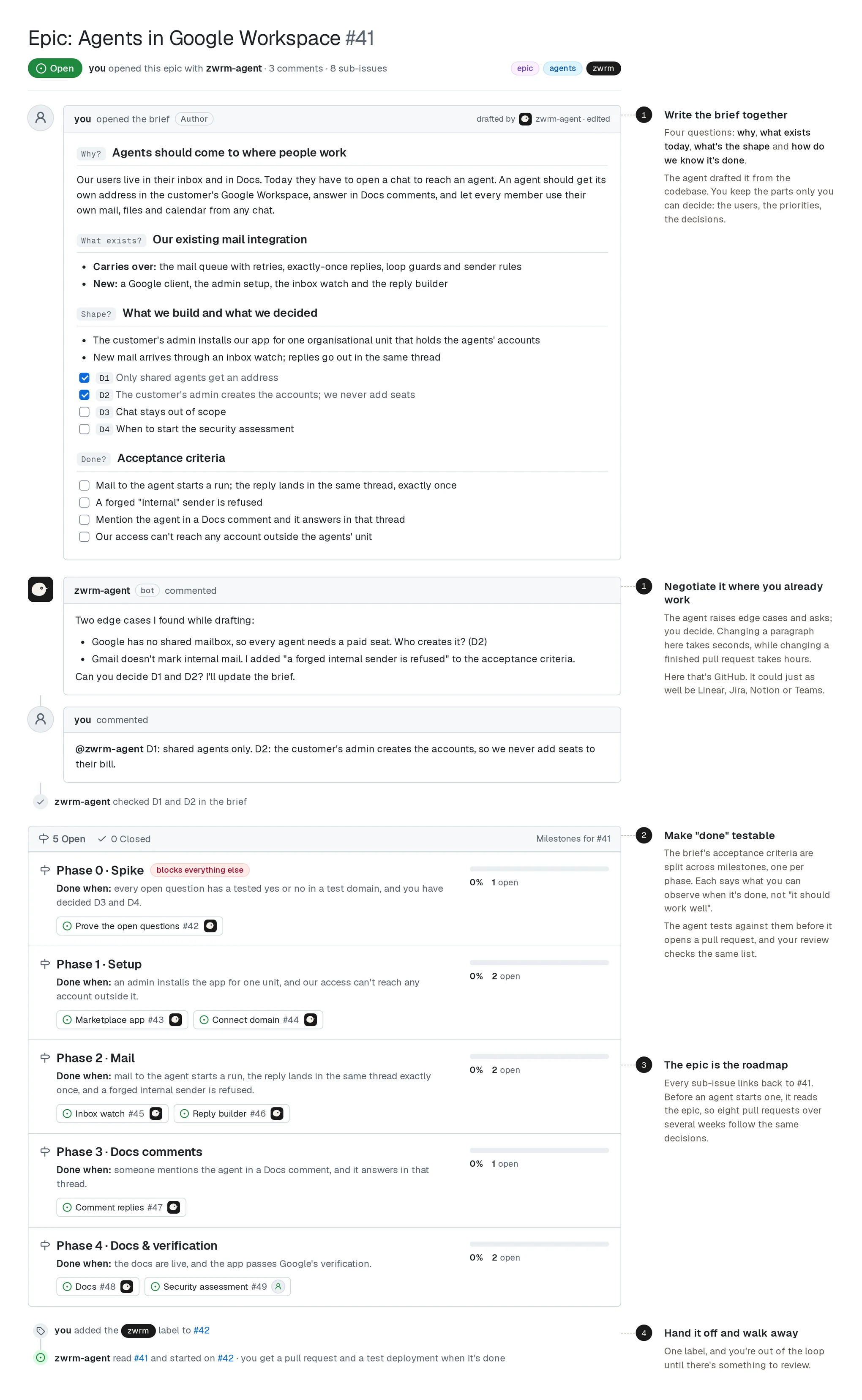
The brief is a product requirements document (PRD), but not the 30-page kind. On our team it’s a single GitHub issue. It can look quite different for each problem and project, depending on the maturity of the project, target audience and how mission-critical it is. But some common questions to answer are:
- Why? What’s the problem, and who has it?
- What exists today? Which parts of the system does this touch?
- What’s the shape? What will we build, and what decisions have we made?
- How do we know it’s done? The acceptance criteria.
You don’t write it alone. Start in a chat with your agent: “Read the codebase and draft a brief for X.” The agent knows the code and finds the edge cases. You know the users and the priorities. Go back and forth until the brief is right.
This is where your time is best spent. Changing a paragraph in a brief takes seconds, while changing a finished pull request can take hours.
Now how and where do you co-create that PRD? That should depend on your preference, not the agent’s. If you like creating GitHub issues, that’s the place you should also create and negotiate the PRD. If you prefer a project management tool like Linear or Jira, you start there. Notion? MS Teams? I think you get the gist…
2. Make “done” testable: milestones with acceptance criteria
Every brief ends with acceptance criteria you can observe and check: this replay triggers that alert within ten minutes, not alerts should work well. The agent tests its own work against them before it calls the job finished, and your review checks the same list. You aren’t reviewing against a vague idea, and the agent isn’t guessing what you meant.
Briefs then roll up into milestones: goals with a scope and their own acceptance criteria, such as “Safety & compliance: admins see alerts in real time and can stop any agent within seconds.” A milestone tells you, and your agents, what this stretch of work is for.
3. Epics are your roadmap
Larger work goes into an epic: one issue with the big picture (why it matters, what exists, the shape, the open decisions) and links to all its sub-issues. When an agent picks up a sub-issue, it reads the epic first. That way twenty pull requests built by different agent runs over several weeks still follow the same decisions.
We build zwrm this way. Our GitHub issues and milestones are the single source of truth for what’s planned, what’s in progress and what’s done. Our own agents read them before they write a line of code.
Here’s what that looks like for one of our own epics, simplified:
4. Hand it off and walk away
Once the brief is ready, hand it over where it already lives. With the zwrm GitHub App, add the zwrm label to the issue, or mention @zwrm-agent (or write /francis) in a comment. The agent then:
- clones the repository into its own environment
- implements the change and runs the tests
- opens a pull request and replies on the issue thread
When you leave review comments on its pull request, the agent picks them up and responds. You can also set up demo deployments (private to you and protected) on every PR.
5. Test it on a throwaway deployment
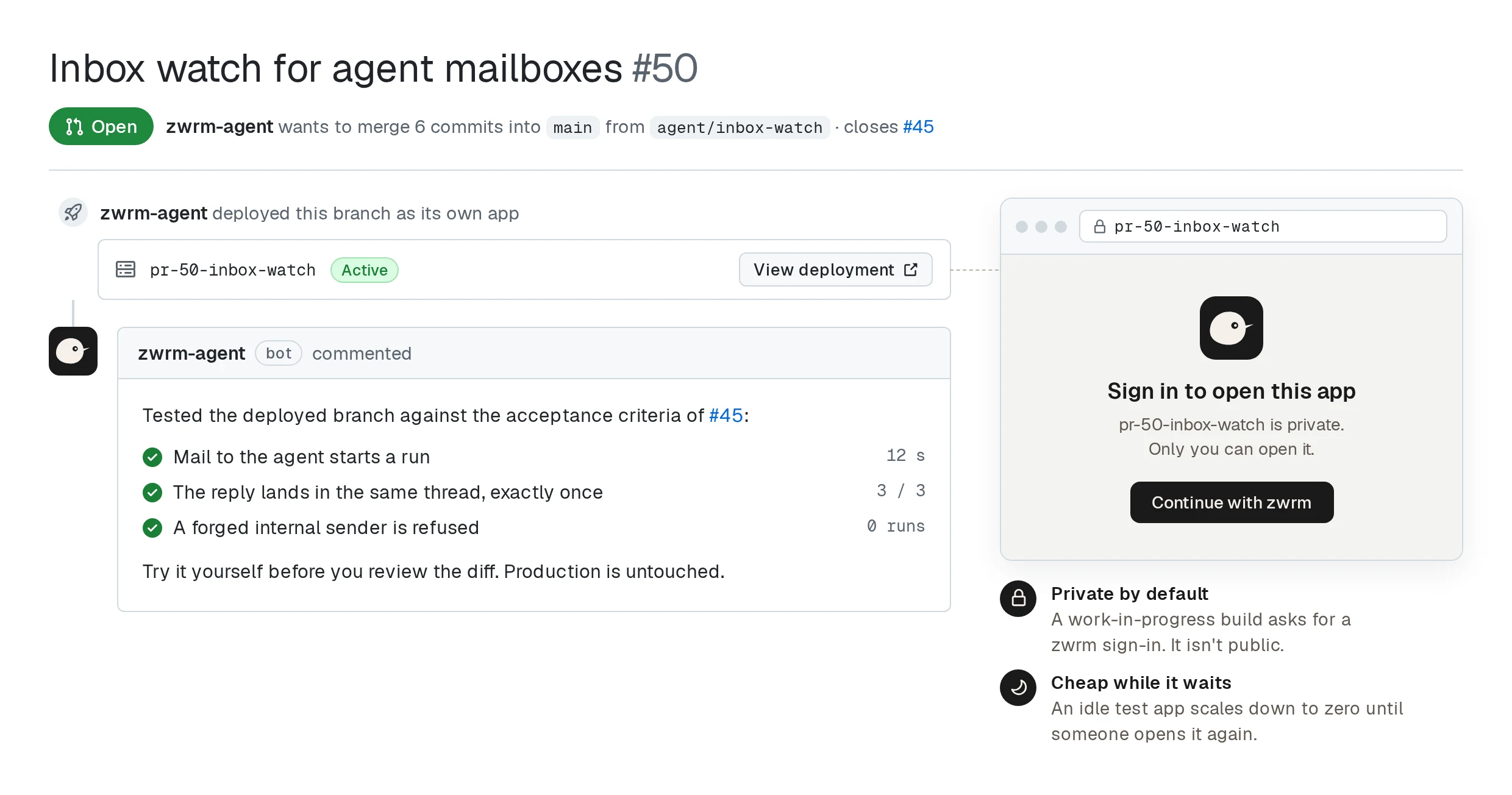
A diff only shows you part of the change. Because a zwrm agent can deploy, it can put its branch up as an app of its own, test it against the acceptance criteria and send you the link.
These test deployments are cheap. Apps require a zwrm sign-in by default, so a work-in-progress build isn’t public, and apps that sit idle scale down to zero.
Work in your tools, not the other way around
Asynchronous work only helps if it doesn’t add yet another tab you have to check. zwrm agents come to you:
- GitHub: issues, pull requests and review comments, as described above. Events such as a merged PR or a published release can also start an agent run.
- Notion: every agent is a member of your Notion workspace. @-mention it in a comment or on a page and it replies right there.
- Jira: assign a work item to zwrm or mention it in a comment, and the agent answers on the work item. Linear and other project management tools connect too.
- Connectors: Google Workspace, Microsoft 365, Sentry, HubSpot, Stripe and many more, connected with each member’s own sign-in.
- Schedules and triggers: agents run on a schedule (“every weekday at 9”) or wake up when a webhook fires.
Results come back the same way: as a pull request, a comment, a reply in a Notion thread, or a push notification from the Cowork app. If an agent gets stuck or needs a decision, its question goes to your Needs you inbox in the dashboard and the agent waits, so it doesn’t guess.
You also choose the agent: Claude Code, OpenAI Codex or the zwrm runtime for full control and no vendor lock-in.
Security by design, which is why you can let go
You can only stop watching if you trust what happens while you’re away. So on zwrm, security is part of the platform itself, not a setting you have to remember to turn on.
- Its own machine. Every agent runs in its own Firecracker microVM. It has no access to your laptop, your other projects or other agents.
- Scoped permissions. Agents get only the capabilities you grant. By default an agent can deploy but can’t delete. Changes take effect immediately.
- No standing credentials. Secrets are encrypted at rest and injected at runtime. Agents use a short-lived identity instead of long-lived tokens.
- Network policy. Allow and block lists are enforced by the host, outside the agent’s reach.
- Humans approve what matters. Tools you mark as “ask first” pause the run until a person approves. Approvals always go to people, never to another agent.
- Model choice. EU-hosted models are available through the zwrm runtime, and admins can require EU-only models across the organization.
- Safety alerts and a kill switch. Real-time alerts flag unusual behavior, such as sudden call spikes, scripted use or bulk reads, by email, Slack, Teams or webhook. One click pauses an agent, a connector or a token.
When zwrm isn’t the right fit
To be honest about it: if your work is highly interactive, for example pixel-level UI work with instant hot reload or testing on device emulators, a local, synchronous tool will probably suit you better. zwrm is at its best when a task can be described up front and checked afterwards. In our experience, that’s most of a product backlog.
Getting started
- Pick one issue from your backlog and rewrite it as a brief: why, what exists, shape, acceptance criteria.
- Install the GitHub App and add the
zwrmlabel to the issue. - Do something else. Come back to a pull request and a running app.
Want to see it on your own codebase? Book a demo or read the docs.
Give AI agents an isolated environment on your own infrastructure. zwrm connects microVMs with databases, deployments, and infrastructure tools.